DigiLocker Kya Hai Ar Isro Use Kaise Karein?

DigiLocker Kya Hai Ar Isro Use Kaise Karein?
Ek Document Gum Ho Gayo… Ar Saaro Kaam Ruk Gayo
अगर आप कदी किसी Government Office, College Admission या Job Application खातर Documents ढूंढता रह्या हो, तो यो Situation थांने Familiar लाग सकै है।
Aadhaar Card कियां है?
10th री Marksheet किस File में राखी है?
Driving License री Photocopy कुण ले गयो?
क्या म्हारा Phone में PAN Card री Scanned Copy भी है?
अर फेर पूरो घर छाण्या बाद Document मिलै है।
कदी-कदी मिलै ही नहीं।
कुछ साल पहलां तक यो बिलकुल Normal बात थी।
लेकिन आज Situation काफी बदल चुकी है।
अब आपरा Important Documents एक Digital Locker में Safely Store हो सकै है, जिणे आप कदी भी अपणा Mobile सूं Access कर सकौ हो।
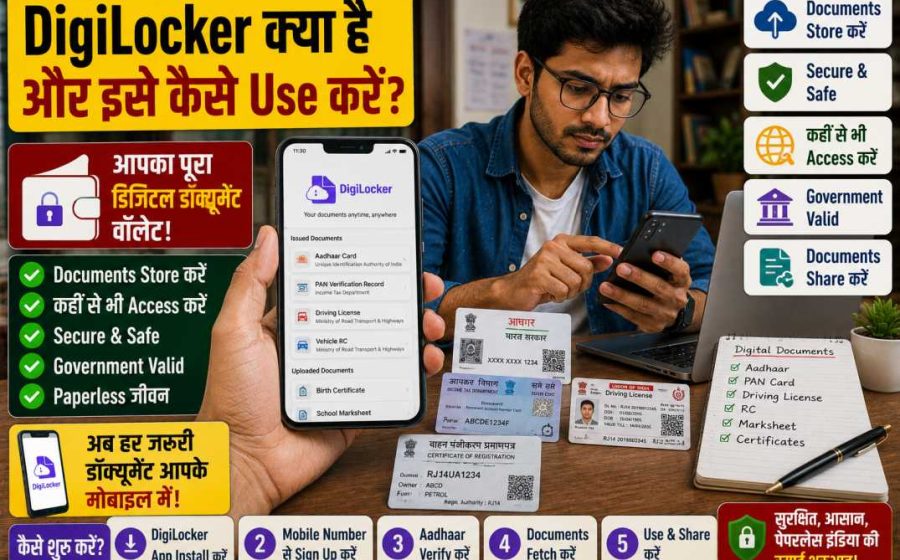
इसी Digital Locker रो नाम है DigiLocker।
घणा लोगां ने लागै है DigiLocker सिरफ Documents Store करणा री जगह है।
लेकिन Reality में घणा Government Documents Directly इसी Platform रा Through Issue भी होवै है अर घणी Situations में इनने Physical Documents जेसो ही Valid मान्यो जावै है।
इसी वजह सूं पिछला कुछ सालां में DigiLocker रो Use घणो तेजी सूं बढ़्यो है।
DigiLocker Kya Hai?
DigiLocker Government of India री एक Digital Document Storage Service है।
इसरो Purpose Citizens ने एक Secure Digital Platform Provide करनो है जठे वो अपणा Important Documents Store, Access अर Share कर सकै।
Simple Words में:
DigiLocker एक Online Digital Document Wallet है।
जैसो आप अपणा Physical Wallet में Aadhaar Card, PAN Card अर Driving License राखो हो, वैसो ही DigiLocker में इन Documents रा Digital Versions एक ही जगह Safely Store कर सकौ हो।
DigiLocker Launch करणा रो Purpose क्या थो?
Government रा कुछ Main Objectives था:
- Paperless Governance ने Promote करनो
- Fake Documents रो Use कम करनो
- Verification Process ने Fast बनाणो
- हर जगह Physical Documents ले जाण री जरूरत कम करणी
सच कहूं तो…
आज भी घणा लोग हर जगह Documents री Photocopies लेकर घूमै है।
DigiLocker पूरी Process ने घणी आसान बना देवै है।
DigiLocker कैसे काम करै है?
यो System घणा Government Departments अर Institutions सूं Connected होवै है।
जद आप DigiLocker Account बनाओ हो अर Aadhaar Verification Complete करो हो, तो कुछ Documents Directly Access कर सकौ हो।
Examples:
- Aadhaar
- PAN
- Driving License
- Vehicle Registration Certificate (RC)
- Educational Certificates
- Insurance Documents
घणा Cases में आपणे Documents Manually Upload करणा री भी जरूरत नहीं पड़ै।
System उनने Directly Issuing Authority सूं Fetch कर लेवै है।
DigiLocker रा सबसे बड़ा Benefits
1. Documents हमेशा आपरा साथ रहै है
यो सबसे बड़ो Advantage है।
आपरो Mobile Phone आपरा पास है।
DigiLocker Phone में है।
Documents भी आपरा साथ है।
2. Physical Copies Carry करणी री जरूरत कम हो जावै है
सोचो।
आप Interview खातर जा रहा हो।
रास्ता में याद आयो कि Marksheet घर पर ही रह गई।
यो काफी Stressful Situation हो सकै है।
DigiLocker इस Problem ने काफी हद तक Solve कर देवै है।
3. Verification Fast हो जावै है
घणा Institutions DigiLocker Documents Accept करै है।
इस सूं Verification Process Fast अर Convenient हो सकै है।
4. Documents Gum होण रो Risk कम होवै है
Paper Documents:
- फट सकै है
- Gum हो सकै है
- खराब हो सकै है
Digital Copies में यो Risks काफी कम हो जावै है।
5. Multiple Devices सूं Access
आप Documents Access कर सकौ हो:
- Mobile Phone
- Tablet
- Laptop
लगभग कहीं सूं भी Documents Available रहै है।
DigiLocker Account कैसे बनावै?
अब Practical Process समझिये।
Step 1: DigiLocker App Install करो
Official DigiLocker Application Install करो।
या Official Website रो Use करो।
कदी भी Unknown Third-Party Apps Use मत करो।
Step 2: Sign-Up Option Select करो
Account Create करणा खातर:
- Mobile Number Enter करो
- OTP सूं Verify करो
Step 3: Username अर Password बनाओ
Strong Password Choose करो।
ऐसा Weak Passwords Avoid करो:
- 123456
- password
- अपणो Mobile Number
Step 4: Aadhaar Verification Complete करो
Aadhaar Verification करणा पर Additional Features Unlock हो जावै है।
Documents Retrieve करणा भी आसान हो जावै है।
क्या Aadhaar Link करनो जरूरी है?
Technically कुछ Features Aadhaar Verification बिना भी Available हो सकै है।
लेकिन ज्यादातर Benefits Aadhaar Verification बाद ही मिलै है।
Aadhaar Link करणा रा Benefits
- Faster Verification
- ज्यादा Documents Access
- Better Integration
- Easier Authentication
DigiLocker में Documents कैसे Add करें?
Generally दो Methods होवै है।
Method 1: Issued Documents Retrieve करो
यो सबसे Useful Method है।
System Documents ने Directly Issuing Authority सूं Fetch करै है।
Examples:
- Driving License
- RC
- Educational Certificates
Method 2: Documents खुद Upload करो
आप Manually भी Documents Upload कर सकौ हो।
Examples:
- Birth Certificate
- Family Related Documents
- Property Documents
- Passport Copies
Issued Documents अर Uploaded Documents में Difference
घणा लोग इस Difference ने Ignore कर देवै है।
Issued Documents
यो Directly किसी Government Department या Issuing Institution सूं आवै है।
Verification Generally आसान होवै है।
Uploaded Documents
यो User खुद Upload करै है।
आम तौर पर यो Scanned Copies या Digital Images होवै है।
DigiLocker में कूण-कूण Documents मिल सकै है?
Available Documents री List Time साथे बढ़ती रहै है।
कुछ Common Examples:
- Aadhaar
- PAN
- Driving License
- Vehicle RC
- Insurance Policies
- School Certificates
- College Certificates
- Government Issued Certificates
Students खातर DigiLocker कितणो Useful है?
म्हारा Experience अनुसार Students DigiLocker सूं घणो Benefit ले सकै है।
Admission Process दौरान
College Admission खातर बार-बार Documents मांग्या जावै है:
- 10th Marksheet
- 12th Marksheet
- Certificates
ऐसी Situations में DigiLocker काफी Helpful होवै है।
Scholarship Applications
जद भी Documents री जरूरत पड़ै, उनने Quickly Access करिया जा सकै है।
Competitive Exams
घणी Examination Related Applications अर Verification Process में Digital Documents Useful होवै है।
DigiLocker में Driving License अर RC कैसे देखें?
यो सबसे Popular Features में सूं एक है।
Process
- DigiLocker Login करो
- Search Section Open करो
- Relevant Authority Select करो
- Details Verify करो
- Document Retrieve करो
अगर Issuing Authority DigiLocker सूं Integrated है तो Document तुरंत Available हो सकै है।
क्या DigiLocker Safe है?
यो एक Natural Question है।
आखिर बात Personal Documents री है।
सच कहूं तो…
आज लोग Cybersecurity ने पहलां सूं घणो ज्यादा Seriously लेवै है।
अर लेणो भी चाहिए।
Security Features
Platform आम तौर पर Multiple Security Measures Use करै है:
- OTP Verification
- Secure Login System
- Identity Verification Mechanisms
लेकिन User री Responsibility भी उतनी ही Important होवै है।
DigiLocker Use करता Time किन गलतियां सूं बचणो चाहिए?
Weak Password Use करनो
सबसे Common Mistakes में सूं एक।
OTP Share करनो
अपणो OTP कदी किसी साथे Share मत करो।
Public Device पर Login रहणो
अगर Cyber Café या Shared Computer Use करो हो तो काम बाद Logout जरूर करो।
Fake Applications Download करणी
सिरफ Official Sources रो ही Use करो।
Ek Real-Life Example
मान लीजिए एक Student ने Urgently Scholarship Application Submit करणी है।
Deadline सिरफ कुछ घंटा बाद है।
Original Marksheet घर पर राखी हुई है।
Student किसी दूसरै शहर में है।
अगर DigiLocker पहलां सूं Setup है तो Required Document हासिल करनो काफी आसान हो सकै है।
ऐसी Situations ही DigiLocker री Actual Usefulness दिखावै है।
किन लोगां ने DigiLocker जरूर Use करनो चाहिए?
- Students
- Job Seekers
- Vehicle Owners
- Government Scheme Beneficiaries
- Working Professionals
- Business Owners
सच कहूं तो Smartphone Use करनो वालो लगभग हर व्यक्ति DigiLocker सूं Benefit ले सकै है।
DigiLocker सिरफ Documents Store करणा री जगह नहीं है
घणा लोग DigiLocker ने Google Drive या Mobile Gallery जेसो ही समझै है।
Document Upload करियो अर काम खत्म।
लेकिन DigiLocker री असली Power उस बाद शुरू होवै है।
Interesting बात यो है…
DigiLocker रो Purpose सिरफ Files ने Safely Store करनो नहीं है।
इसरो Goal Document Verification अर Digital Governance ने आसान बनाणो भी है।
इसी वजह सूं घणा Government Departments, Universities अर Institutions इस सूं Connected है।
DigiLocker में Issued Documents क्या होवै है?
अगर आप पहली बार DigiLocker Use कर रहा हो तो थांने एक Term दिखसी:
Issued Documents
यो Normal Uploaded PDF Files सूं अलग होवै है।
एक Simple Example
मान लीजिए आपने अपणी 12th री Marksheet Scan करके Upload कर दी।
यो एक Uploaded Document है।
लेकिन अगर Education Board ने वही Marksheet Directly DigiLocker रा Through Issue करी है, तो वो Issued Document कहलावै है।
दोनों में Difference होवै है।
Issued Documents ज्यादा Useful क्यूं होवै है?
क्यूंकि यो Directly Issuing Authority सूं Connected होवै है।
Verification Process आसान हो जावै है।
अर Document री Authenticity पर Doubt भी कम रहै है।
DigiLocker में Documents कैसे ढूंढै?
घणा Users Account तो बना लेवै है।
लेकिन Documents Retrieve करणा नहीं जाणै।
Step-by-Step Process
Step 1
Login करो।
Step 2
Search या Browse Issuers Section Open करो।
Step 3
Relevant Institution Search करो।
Examples:
- Education Boards
- Transport Departments
- Insurance Providers
Step 4
Required Information Enter करो।
Step 5
Document Retrieve करो।
अगर Institution DigiLocker सूं Connected है तो Document Directly आपरा Account में Add हो सकै है।
DigiLocker में Marksheet कैसे निकालै?
यो DigiLocker रा सबसे Common Uses में सूं एक है।
खास कर Students खातर।
एक Practical Situation
मान लीजिए:
College Admission Process चाल रही है।
Original Marksheet घर पर राखी हुई है।
अर आप Hostel में रह रहा हो।
ऐसी Situation में DigiLocker घणो Useful साबित हो सकै है।
Typical Process
- Relevant Board Select करो
- Roll Number Enter करो
- Required Information Verify करो
- Marksheet Retrieve करो
अगर Board DigiLocker System सूं Connected है तो Process काफी आसान हो सकै है।
DigiLocker में Driving License कैसे देखै?
Driving License ने Digitally Access करनो DigiLocker रा सबसे Popular Features में सूं एक है।
Process
- DigiLocker Login करो
- Transport Services Search करो
- License Details Enter करो
- Verification Complete करो
अगर Records Available है तो License Retrieve करियो जा सकै है।
RC (Registration Certificate) कैसे निकालै?
यो Feature Vehicle Owners खातर घणो Useful है।
खास कर Travel दौरान।
Example
मान लीजिए आप Long Journey पर हो।
Original RC घर पर रह गई।
ऐसी Situation में Digital Copy Access कर पाणो घणो Convenient हो सकै है।
Process लगभग Same है
- Vehicle Details Enter करो
- Records Verify करो
- RC Retrieve करो
DigiLocker में eSign क्या होवै है?
अब बात करिये एक ऐसे Feature री जिणे घणा लोग Ignore कर देवै है।
eSign
eSign रो मतलब क्या होवै है?
Document ने Digitally Sign करनो।
Traditional Process कुछ ऐसो होवै है:
Document Print करो।
Sign करो।
Scan करो।
Upload करो।
eSign Method
Document ने Digitally Sign करो।
यो Process काफी Fast हो सकै है।
यो कद Useful होवै है?
- Application Forms
- Official Forms
- Agreements
- Digital Submissions
Document Sharing Feature कैसे काम करै है?
घणी बार सिरफ Document देखणो काफी नहीं होवै।
आपणे किसी Institution ने Document भेजणो भी पड़ै है।
Traditional Method
Document Download करो।
Attach करो।
Email सूं भेजो।
काम खत्म।
DigiLocker Method
घणी Situations में Secure Document Sharing Options Available होवै है।
इस सूं Verification Process और Organized अर Efficient हो सकै है।
क्या DigiLocker Physical Documents ने Replace कर सकै है?
यो घणो Common Question है।
अर इसरो Answer Situation पर Depend करै है।
Reality क्या है?
हर Institution री अपणी Requirements हो सकै है।
कुछ Cases में Digital Documents काफी होवै है।
कुछ Situations में Original Document Verification अभी भी जरूरी हो सकै है।
एक Practical Suggestion
म्हारी Personal Recommendation यो है:
Digital Copies भी राखो।
Original Documents भी Safely राखो।
दोनों रो Combination आम तौर पर Best Approach होवै है।
Government Schemes में DigiLocker रो Use कैसे होवै है?
घणी Government Schemes में Document Verification एक Important Part होवै है।
Common Documents
- Aadhaar
- Identity Proof
- Address Proof
- Certificates
जद DigiLocker Available होवै है तो इन Documents ने Manage करनो काफी आसान हो जावै है।
Job Applications में DigiLocker रो Role
म्हारा Experience अनुसार Job Seekers DigiLocker सूं काफी Benefit ले सकै है।
क्यूं?
Job Applications में बार-बार Documents Submit करणा पड़ै है।
Examples:
- Marksheets
- Degrees
- Identity Proof
- Certificates
अगर Documents पहलां सूं Organized है तो काफी Time बच सकै है।
Students DigiLocker इतनो ज्यादा क्यूं Use करै है?
Student Life में Documents री जरूरत लगभग कदी खत्म नहीं होवै।
Common Requirements
- College Admissions
- Scholarships
- Internships
- Competitive Examinations
- Campus Placements
हर जगह Documents री Demand होवै है।
Practical Experience
घणा Students Application Deadline रा आखरी दिन Documents ढूंढणो शुरू करै है।
तब DigiLocker री Actual Value समझ आवै है।
Common DigiLocker Problems अर उनरा Solutions
अब कुछ Common Issues अर उनरा Possible Solutions समझिये।
Problem #1: OTP नहीं आ रह्यो
यो घणी Common Complaint है।
Possible Reasons
- Network Issue
- SMS Delay
- गलत Mobile Number
- Temporary Server Load
आपणे क्या करनो चाहिए?
- Network Signal Check करो
- थोड़ा Wait करो
- Mobile Number Verify करो
- दोबारा Try करो
Problem #2: Aadhaar Verification Fail हो रही है
घणा Users ने यो Issue Face करनो पड़ै है।
Possible Reasons
- Information Mismatch
- Technical Issue
- Verification Delay
Solution
Enter करी गई सारी Information ने ध्यान सूं Review करो।
Problem #3: Document Retrieve नहीं हो रह्यो
यो सबसे Common Frustrations में सूं एक है।
Possible Reasons
- गलत Information Enter करणी
- Institution Integration Issue
- Records Available नहीं होणा
- Temporary Technical Problem
Practical Tip
Information Enter करता Time Spellings अर Numbers दोबारा Check करो।
छोटी सी Mistake भी Problem Create कर सकै है।
Problem #4: Login Issues
घणी बार Users Account Access करणा में Problem Face करै है।
Common Reasons
- गलत Password
- Login Credentials भूल जावणो
- Mobile Number Related Issue
Solution
Official Account Recovery Process Follow करो।
Problem #5: App Slow चाल रही है
यो भी Common Complaint है।
Possible Reasons
- Weak Internet Connection
- Outdated App Version
- Device Related Limitations
Quick Solutions
- App Update करो
- App Restart करो
- Stable Internet Connection Use करो
DigiLocker अर Cloud Storage में क्या Difference है?
घणा लोग पूछै है:
“Google Drive अर DigiLocker में क्या Difference है?”
अर सच में दोनों काफी अलग है।
Google Drive
एक General-Purpose File Storage Service है।
DigiLocker
Government-Supported अर Document-Focused Platform है।
Verification Support अर Issuer Integration इसरी सबसे बड़ी Strengths है।
Users री सबसे बड़ी गलती
सच कहूं तो…
घणा लोग Account बना कर उसने भूल जावै है।
Registration कर लेवै है।
लेकिन Documents Organize नहीं करै।
Verification Complete नहीं करै।
अर फेर Emergency रा Time Use करणा री कोशिश करै है।
Better Approach क्या है?
जैसे ही Account Create करो:
✅ Aadhaar Verification Complete करो
✅ Important Documents Add करो
✅ Recovery Options Setup करो
✅ Login Credentials Safely Store करो
यो छोटा Steps Future में काफी Time बचा सकै है।
Expert Perspective
पिछला कुछ सालां में Digital Documents रो Use घणो तेजी सूं बढ़्यो है।
लेकिन आज भी घणा Users DigiLocker री पूरी Capabilities नहीं समझै।
ज्यादातर लोगां ने लागै है कि इसरो सबसे बड़ो Benefit Convenience है।
लेकिन यो सिरफ कहानी रो एक हिस्सो है।
असली Benefit है Organized Document Management।
जद सारे Important Documents एक ही Organized जगह पर Available होवै है, तो Applications, Admissions अर Verification Processes काफी आसान हो जावै है।
सच कहूं तो DigiLocker री असली Value Emergency में समझ आवै है
जद सब कुछ Normal चाल रह्यो होवै है, तब DigiLocker सिरफ एक और App लाग सकै है।
लेकिन जद किसी Important Document री Urgently जरूरत पड़ जावै, तब इसरी Actual Value समझ आवै है।
सोचो:
- काल आपरो Interview है
- Original Marksheet घर पर राखी है
- अर आप किसी दूसरै शहर में हो
या फेर:
- Traffic Checking दौरान थांने रोक लियो गयो
- Driving License घर पर रह गयो
या:
- Scholarship Application री आज Last Date है
ऐसी Situations में DigiLocker घणो Useful साबित हो सकै है।
क्या DigiLocker रा Documents Legally Valid होवै है?
यो सवाल लगभग हर नवा User रा दिमाग में आवै है।
“अगर म्हें Mobile में Document दिखाऊं तो क्या वो Accept होसी?”
“क्या Digital Documents Valid होवै है?”
Practical Perspective सूं देखां तो DigiLocker ने Digital Document Management अर Verification ने आसान बनावण खातर बनायो गयो है।
लेकिन अलग-अलग Institutions अर Authorities री अपणी Requirements हो सकै है।
इसी खातर अगर किसी Process में Specifically Original Documents मांग्या गया हो, तो उनने भी साथे राखणो चाहिए।
म्हारो Personal Approach घणो Simple है:
Digital Copies भी राखो अर Original Documents भी Safely राखो।
जद दोनों Available होवै है, तो Problems आवण रा Chances घणा कम हो जावै है।
Students खातर DigiLocker Game Changer क्यूं हो सकै है?
म्हारा Experience अनुसार Students DigiLocker रो उतनो Use नहीं करै जितनो उनने करनो चाहिए।
जबकि सबसे ज्यादा Benefit भी उनने ही मिल सकै है।
College Admissions
जैसे ही Admission Process शुरू होवै है, Documents री लंबी List सामने आ जावै है:
- 10th Marksheet
- 12th Marksheet
- Transfer Certificate
- Category Certificate
- Aadhaar Card
अर फेर PDF Files अर Scanned Copies ढूंढण रो सिलसिलो शुरू हो जावै है।
अगर Documents पहलां सूं Organized होवै तो घणो Stress बच सकै है।
Scholarship Applications
Scholarship Forms में बार-बार Documents Upload करणा पड़ै है।
ऐसी Situations में Organized Digital Records घणा Valuable हो जावै है।
Competitive Examinations
Government Exams अर Entrance Tests में भी Document Verification होवै है।
Last Moment पर Files ढूंढण सूं Better है पहलां सूं Ready रहणो।
Job Seekers ने DigiLocker क्यूं Use करनो चाहिए?
Job Search दौरान एक बात घणी जल्दी समझ आवै है।
लगभग हर Company Similar Documents मांगै है।
Common Documents
- Aadhaar Card
- PAN Card
- Degree Certificate
- Marksheets
- Supporting Certificates
घणा Candidates Interview Call आवण बाद ही Documents Collect करणा शुरू करै है।
इस सूं Unnecessary Pressure Create हो जावै है।
एक Real-Life Situation
मान लीजिए शाम ने आपणे Interview Call आवै है।
HR बोलै:
“Please अपणा Documents काल सुबह तक भेज दीजिए।”
अगर Documents Organized नहीं है तो पूरी रात उनने ढूंढण में निकल सकै है।
Working Professionals खातर Benefits
सिरफ Students ही नहीं, Working Professionals भी DigiLocker सूं घणो Benefit ले सकै है।
Loan Applications
Identity अर Supporting Documents बार-बार मांग्या जावै है।
Job Change
हर Organization Hiring Process में Documents Verify करै है।
Insurance Claims
Important Records तक तुरंत Access मिलणो घणो Helpful हो सकै है।
DigiLocker अर Cybersecurity
अब बात करिये एक ऐसे Topic री जिणे लोग अक्सर Ignore कर देवै है।
Security।
सच कहूं तो…
Documents ने Store करणा सूं भी ज्यादा Important उनने Protect करनो है।
सबसे Common Security Mistakes
Weak Password Use करनो
आज भी घणा लोग ऐसा Password Use करै है:
- 123456
- abc123
- अपणो Mobile Number
यो Risky Approach है।
हर जगह Same Password Use करनो
यो और भी Dangerous है।
अगर एक Account Compromise हो गयो तो बाकी Accounts भी Risk में आ सकै है।
OTP Share करनो
OTP Related Scams आज भी घणा Common है।
Rule Simple है:
OTP सिरफ थारा खातर है।
Fake Calls पर भरोसो करनो
Scammer बोलै:
“म्हें DigiLocker Support सूं बोल रह्यो हूं।”
उस बाद OTP मांगै है।
अर वहीं सूं Fraud शुरू हो जावै है।
एक Simple Security Checklist
हर DigiLocker User ने यो Practices Follow करणी चाहिए:
✅ Strong Password Use करो
✅ OTP कदी Share मत करो
✅ सिरफ Official Application Use करो
✅ Public Devices पर काम बाद Logout करो
✅ Mobile Number Active राखो
✅ Recovery Options Updated राखो
DigiLocker सूं जुड़ा 5 Common Myths
Digital Services ने लेकर घणा Misconceptions भी होवै है।
Myth #1: DigiLocker सिरफ Students खातर है
बिलकुल नहीं।
हर Age Group रा लोग इसरो Benefit ले सकै है।
Myth #2: सिरफ Aadhaar ही Store कर सकै है
Reality में घणा तरह रा Documents Available हो सकै है।
Myth #3: Internet बिना कुछ Access नहीं हो सकै
घणा Users जरूरत पड़ण पर Downloaded Copies भी साथे राखै है।
Myth #4: अब Physical Documents री कदी जरूरत नहीं पड़सी
यो Assumption हमेशा सही नहीं होवै।
कुछ Institutions आज भी Original Documents मांग सकै है।
Myth #5: Setup करनो घणो मुश्किल है
Reality में Initial Setup Process काफी Simple है।
DigiLocker Use करणी री Best Practices
Account बनाणो सिरफ पहलो Step है।
उस बाद Proper Management भी उतनो ही Important है।
Documents ने Organized राखो
Documents ने Random तरीके सूं Upload मत करो।
जठे Possible हो, Categories में Organize करो।
Information Regularly Review करो
Mobile Number अर Linked Information Updated राखो।
Login Credentials Secure राखो
Passwords ने Public या आसानी सूं Accessible जगहां पर मत लिखो।
Backup Mindset राखो
Digital Copies Useful है।
लेकिन Original Documents ने भी Safely Store करनो चाहिए।
Real Example #1
Ravi Jaipur सूं Delhi Interview देण गयो।
Interview Location पर पहुंचण बाद उसने याद आयो कि Degree Certificate घर पर रह गयो।
खुशकिस्मती सूं उसरा पास Digital Documents Available था।
उसने Required Copy तुरंत Retrieve कर ली।
अगर Documents Available नहीं होवै तो Situation घणी मुश्किल हो सकै थी।
Real Example #2
एक Student Scholarship Application Complete कर रह्यो थो।
उस दिन Final Submission Deadline थी।
Original Marksheet गांव वालै घर में राखी हुई थी।
Digital Documents Available होण री वजह सूं Application Time पर Submit हो गई।
Real Example #3
एक Vehicle Owner ने Traffic Verification दौरान Driving License दिखाणो थो।
Physical Copy उसरा पास नहीं थी।
उसने Digital Document Access करके Situation Handle कर ली।
सबसे बड़ो Benefit जिणे लोग Ignore कर देवै है
ज्यादातर लोगां ने लागै है DigiLocker रो सबसे बड़ो Advantage Document Storage है।
लेकिन ऐसो नहीं है।
सबसे बड़ो Benefit है:
Peace of Mind.
थांने पता होवै है कि आपरा Important Records एक Organized जगह पर Available है।
अर Emergency रा Time यही Confidence सबसे ज्यादा काम आवै है।
Expert Perspective
पिछला कुछ सालां में Digital Governance अर Document Management घणो बदल चुक्यो है।
लेकिन Users री एक Habit आज भी नहीं बदली।
लोग आज भी Documents ने Properly Organize नहीं करै।
अर फेर Emergency रा Time Panic करै है।
म्हारा Experience अनुसार DigiLocker रो सबसे ज्यादा Benefit उन लोगां ने मिलै है जो सिरफ Account बनाकर छोड़ नहीं देवै।
वो Setup Process Complete करै है।
Records Organize करै है।
अर Documents ने Properly Maintain राखै है।
सिरफ App Install करनो काफी नहीं है।
Proper Setup अर Document Management भी उतनो ही Important है।
Frequently Asked Questions (FAQs)
1. DigiLocker क्या है?
DigiLocker एक Digital Document Storage अर Management Platform है जठे Users Important Documents ने Access अर Manage कर सकै है।
2. DigiLocker Account कैसे बनायो जावै है?
Mobile Number Verify करके अर Registration Process Complete करके Account बनायो जा सकै है।
3. क्या DigiLocker Free है?
हां। General Use खातर DigiLocker बिना किसी Charge रा Use करियो जा सकै है।
4. क्या Aadhaar Linking जरूरी है?
Additional Features अर Documents Access करणा खातर Aadhaar Verification घणी Useful होवै है।
5. क्या DigiLocker Safe है?
Platform Multiple Security Measures Use करै है, लेकिन Users ने भी Strong Password अर OTP Safety Practices Follow करणी चाहिए।
6. क्या म्हें DigiLocker सूं Marksheet निकाल सकूं?
हां, अगर Relevant Education Board DigiLocker सूं Integrated है।
7. क्या म्हें DigiLocker में Driving License देख सकूं?
हां, Connected Transport Services रा Through Driving License Access करियो जा सकै है।
8. क्या OTP Share करणी Safe है?
नहीं। OTP कदी भी किसी साथे Share नहीं करणी चाहिए।
9. क्या DigiLocker Mobile अर Computer दोनों पर Use हो सकै है?
हां। Supported Devices पर Mobile अर Desktop दोनों रा Through Access करियो जा सकै है।
10. DigiLocker रो सबसे बड़ो Benefit क्या है?
Important Documents ने Store करनो, Access करनो, Organize करनो अर Manage करनो घणो आसान हो जावै है।
Final Conclusion
DigiLocker सिरफ एक Document Storage Application नहीं है। यो Digital Document Management ने आसान बनावण खातर बनायो गयो एक Practical Solution है। चाहे आप Student हो, Job Seeker हो, Working Professional हो या Vehicle Owner हो, Important Records ने Organized राखणो हमेशा फायदेमंद होवै है।
घणा लोग DigiLocker तब Use करणा शुरू करै है जद उनने किसी Document री Urgent जरूरत पड़ै है। लेकिन Better Approach यो है कि Account पहलां सूं Setup राख्यो जावै, Important Documents Properly Organize करिया जावै अर Basic Security Practices Follow करी जावै।
आज रा Time में Important Documents रो Digital Backup राखणो कोई Luxury नहीं, बल्कि एक Smart Habit है। अर इसी वजह सूं DigiLocker जेसा Tools हर साल और भी ज्यादा Valuable होता जा रह्या है।
Leave a Reply