
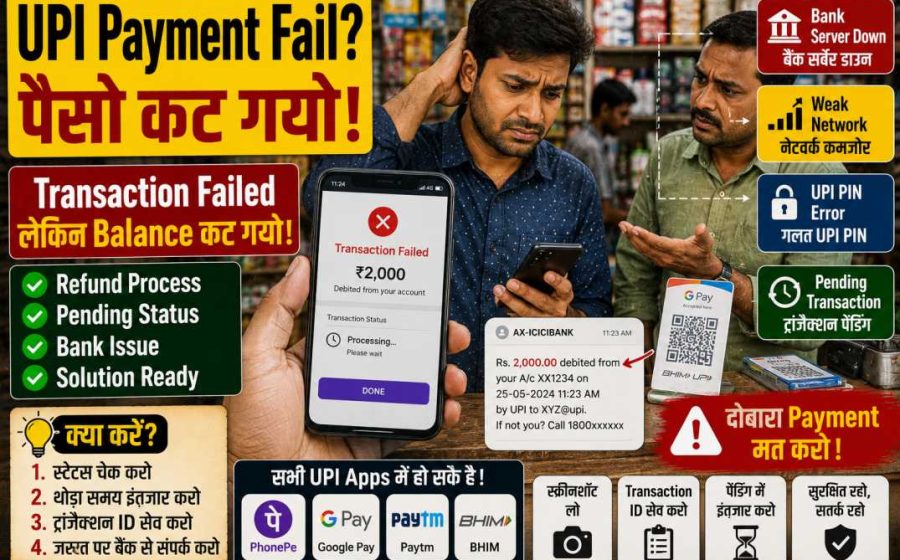
UPI Payment Fail Ho Jaye To Kya Karein?

Ek Chhoto Sa Payment Process… Ar Pher Pareshani Shuru Ho Jaave Hai
Kuch saal पहलां ₹500 भेजणा खातर Bank जाणो पड़तो थो।
आज आप सिरफ Phone निकालो हो, QR Code Scan करो हो अर Payment हो जावै है।
कम से कम Theory में तो ऐसो ही लागै है।
Reality थोड़ी अलग है।
कदी Network Issue आ जावै है।
कदी Server Down हो जावै है।
कदी Account सूं Paisa कट जावै है लेकिन सामने वाला ने मिलै ही नहीं।
कदी App सिरफ “Processing” दिखावती रहै है।
अर कदी सीधो “Transaction Failed” लिख कर आ जावै है।
अगर आप Regularly UPI Use करो हो तो घणा Chances है कि थांने यो Situation कम सूं कम एक बार जरूर Face करी होसी।
सच कहूं तो…
UPI Payment Fail होण सूं भी ज्यादा Frustration तब होवै है जद Account सूं Paisa कट जावै अर सामने वालो बोलै:
“भाई, मन्ने तो Paisa मिल्यो ही नहीं।”
उस Time सबसे पहलो Sawaal दिमाग में आवै है:
Paisa गयो कियां?
अच्छी बात यो है कि ज्यादातर Cases में Paisa Permanently Lost नहीं होवै।
बस Issue रो Actual Reason समझणो जरूरी होवै है।
UPI Payment System कैसे काम करै है?
Problem समझण सूं पहलां Process समझणो Useful होवै है।
जद आप UPI Payment भेजो हो तो सिरफ दो लोग Involved नहीं होवै।
Background में घणा Systems मिलकर काम करै है:
- Sender रो Bank
- Receiver रो Bank
- UPI Application
- NPCI Network
- Banking Servers
यो सब Systems कुछ Seconds में एक-दूसरा सूं Communicate करै है।
इसी वजह सूं किसी भी एक Level पर Problem आवण सूं Transaction Fail हो सकै है।
क्या Failed UPI Payment रो मतलब Paisa गयो?
नहीं।
यो सबसे Common Misconceptions में सूं एक है।
Generally तीन Situations हो सकै है।
Situation 1
Payment Fail हो गई।
Account सूं Paisa नहीं कट्यो।
कोई Issue नहीं है।
Situation 2
Payment Fail हो गई।
Paisa Account सूं कट गयो।
Automatic Refund Process Start हो चुक्यो है।
Situation 3
Payment Pending है।
Final Status अभी Decide नहीं हुओ है।
सबसे ज्यादा Confusion इसी Situation में होवै है।
अगर UPI Payment Fail हो जावै तो सबसे पहलां क्या करें?
Panic मत करो।
सबसे पहलां यो Check करो:
Transaction Status
अपणी UPI App Open करो।
History Section में जाओ।
Status Check करो:
- Successful
- Failed
- Pending
- Processing
हर Status रो अलग Meaning होवै है।
Problem #1: Weak Internet Connection
यो सबसे Common Reason है।
घणा लोगां ने लागै है कि QR Scan करनो ही काफी है।
लेकिन Payment Process दौरान Transaction ने घणा Servers सूं होकर गुजरनो पड़ै है।
अगर Internet Connection Unstable है तो Process बीच में रुक सकै है।
Real Example
मान लीजिए आप Highway पर किसी Dhaba पर Payment कर रहा हो।
Signal Weak है।
आपने QR Scan करियो।
PIN Enter करियो।
Loading Screen आई।
अर फेर Transaction Fail हो गई।
इस Case में Problem Bank री नहीं थी।
Problem Connectivity री थी।
Solution
- अगर Available हो तो Wi-Fi Use करो
- Mobile Data Network Switch करो
- Airplane Mode On-Off करो
- Strong Signal वाली जगह पर चाल जाओ
यो Simple लागै है।
लेकिन हैरानी री बात यो है कि घणा Issues यहीं Solve हो जावै है।
Problem #2: Bank Server Down है
घणी बार Problem User री Side पर नहीं होवै।
Problem Bank री Side पर होवै है।
यो कैसे होवै है?
Banking Systems पर कदी-कदी घणो Traffic आ जावै है।
खास कर:
- Salary Days
- Festival Season
- महीना रा आखरी दिन
- Peak Transaction Hours
जैसे-जैसे Server Load बढ़ै है, Transaction Failures भी बढ़ सकै है।
Common Signs
Internet Perfectly काम कर रह्यो है।
UPI App भी सही चाल रही है।
लेकिन Transactions बार-बार Fail हो रही है।
यो Bank Server Issue रो Signal हो सकै है।
आपणे क्या करनो चाहिए?
5–10 Minute Wait करो।
उस बाद दोबारा Try करो।
घणी बार System Automatically Restore हो जावै है।
Problem #3: Receiver Bank में Issue है
Interesting बात यो है कि Sender री Side पर सब कुछ Perfectly काम कर रह्यो हो सकै है।
Problem Receiver रा Bank में हो सकै है।
Example
आप Payment भेजो हो।
आपरो Bank Active है।
UPI App भी सही चाल रही है।
लेकिन Receiver रो Bank Maintenance Mode में है।
Result?
Transaction Fail।
कैसे Confirm करें?
Receiver सूं पूछो:
- क्या दूसरी Payments Receive हो रही है?
- क्या उनरी Banking App सही चाल रही है?
घणी बार पूरा Issue Receiver री Side पर होवै है।
Problem #4: Daily UPI Limit Cross हो गई
घणा लोग इस Point ने Ignore कर देवै है।
UPI Transactions पर Limits होवै है।
अलग-अलग Banks अर Apps री Limits अलग हो सकै है।
Practical Example
सुबह:
₹20,000 भेज्या
दोपहर:
₹30,000 भेज्या
शाम:
₹50,000 भेज्या
अब आप एक और Payment करणा री कोशिश करो हो।
Transaction Fail हो जावै है।
Reason?
Daily Transaction Limit।
Solution
- अगला दिन तक Wait करो
- अपणा Bank री Transaction Limit Check करो
- Transaction History Review करो
Problem #5: गलत UPI PIN
यो Basic लागै है।
लेकिन घणो Common Issue है।
खास कर जद:
- नवो Phone Use कर रहा हो
- Multiple Bank Accounts हो
- Multiple UPI Apps Use करता हो
Typical Situation
User ने लागै है कि PIN याद है।
वो PIN Enter करै है।
Transaction Reject हो जावै है।
फेर दोबारा Try करै है।
फेर Fail हो जावै है।
Reality में PIN गलत होवै है।
Solution
PIN Reset करो।
लेकिन सिरफ Official Application रा Through।
कदी भी किसी Unknown Link या Phone Call रा Through PIN Reset मत करो।
Problem #6: UPI App में Technical Error
हर App में कदी ना कदी Technical Issues आवै है।
चाहे Popular UPI App हो या Banking App।
Symptoms
- App बार-बार Crash हो रही है
- Payment Page Open नहीं हो रह्यो
- Transaction अटक जावै है
- QR Code Scan नहीं हो रह्यो
Quick Solutions
- App Restart करो
- App Cache Clear करो
- App Update करो
- Phone Restart करो
म्हारा Experience अनुसार सिरफ Device Restart करणा सूं भी घणा Issues Solve हो जावै है।
Problem #7: Bank Account पर Restriction Ya Hold
घणी बार Account पर Restrictions लग जावै है।
अर User ने उसरी Information भी नहीं होवै।
Possible Reasons
- KYC Pending है
- Compliance Review चाल रह्यो है
- Security Related Restriction है
- Banking Related Issue है
कैसे पता चालसी?
- ATM Transactions Fail हो रही है
- Internet Banking में Problem आ रही है
- Bank Branch Restriction बारे में बतावै है
Paisa कट गयो लेकिन Receiver ने मिल्यो नहीं
अब बात करिये सबसे Common अर Stressful Situation री।
यही वो Case है जो लोगां ने सबसे ज्यादा Pareshan करै है।
Transaction Failed दिखा रही है।
लेकिन Paisa Account सूं कट चुक्यो है।
अब क्या करें?
सबसे पहलां Screenshot लो।
फेर Transaction ID Note करो।
उस बाद Transaction Status Monitor करता रहो।
ऐसी Situations में तुरंत दोबारा Payment कर देवणो घणी बार Duplicate Payment रो Reason बन जावै है।
सबसे बड़ी गलती जो लोग करै है
Payment Fail हुई।
Receiver ने बोल्यो Paisa नहीं मिल्यो।
Sender ने तुरंत दोबारा Payment भेज दी।
10 Minute बाद पहली Transaction Successful Mark हो गई।
अब Duplicate Payment हो गई।
यो Situation लोगां रा सोच्या सूं भी ज्यादा Common है।
एक Golden Rule
अगर Paisa Account सूं कट गयो है अर Final Status अभी Clear नहीं है:
तुरंत दूसरी Payment मत भेजो।
पहली Transaction रो Final Status आवण रो Wait करो।
Paisa Kat Gayo Lekin Transaction Failed Dikha Rahi Hai – Ab Kya Hovsi?
यही वो Situation है जठे सबसे ज्यादा Confusion होवै है।
आपने Payment करी।
PIN डाल्यो।
Loading Screen आई।
अर फेर Message आयो:
“Transaction Failed”
लेकिन जद Account Balance Check करियो तो Paisa कट चुक्यो थो।
उस Moment पर लागै है कि Paisa हवा में गायब हो गयो।
Reality में ज्यादातर Cases में ऐसो नहीं होवै।
UPI System हर Transaction रो Record राखै है।
चाहे Transaction Successful हो, Failed हो या Pending।
इसी खातर Paisa Permanently गायब हो जावणो घणो Rare Situation होवै है।
सबसे पहलां Transaction ID Save करो
घणा लोगां ने पता ही नहीं होवै कि Future Dispute या Complaint में Transaction ID सबसे Important Proof बन जावै है।
जद भी Payment Related Issue आवै:
- Transaction ID Note करो
- Screenshot लो
- Amount Note करो
- Date अर Time Save करो
यो Details Complaint अर Follow-up Process में घणी काम आवै है।
UPI Transaction Status रो Actual Meaning क्या होवै है?
घणा लोग Status तो देखै है लेकिन उसरो Exact Meaning नहीं समझै।
हर Status अलग Situation ने Represent करै है।
Status: Successful
यो सबसे Simple Situation है।
Paisa Successfully Transfer हो चुक्यो है।
Receiver ने Amount मिल चुकी है।
Status: Failed
Transaction Complete नहीं हुई।
अगर Paisa कट गयो है तो Refund Process Start हो सकै है।
Status: Pending
यहीं सबसे ज्यादा Patience री जरूरत होवै है।
Pending रो मतलब है Transaction अभी भी Process हो रही है।
Final Result अभी Decide नहीं हुओ है।
Status: Processing
System अभी Transaction Complete करणा री कोशिश कर रह्यो है।
यो आम तौर पर Temporary Stage होवै है।
Pending Transaction में सबसे बड़ी गलती
सच कहूं तो…
ज्यादातर Users इसी Stage पर गलती करै है।
Transaction Pending है।
Receiver बोलै Paisa नहीं मिल्यो।
Sender तुरंत वही Amount दोबारा भेज देवै है।
कुछ Minute बाद पहली Transaction भी Successful हो जावै है।
अब Duplicate Payment हो चुकी होवै है।
ऐसा Cases रोज देखण ने मिलै है।
कितणो Wait करनो चाहिए?
अगर Transaction Pending है तो थोड़ा Time देवणो जरूरी होवै है।
System ने Process Complete करणा रो मौका मिलणो चाहिए।
बार-बार App Refresh करणा या दोबारा Payment भेजणा सूं Problem Solve नहीं होवै।
Refund Process कैसे काम करै है?
अगर Transaction Complete नहीं हुई लेकिन Paisa कट गयो, तो Refund Process Generally Automatic होवै है।
घणी Situations में User Complaint करै उस सूं पहलां ही Refund Process Start हो जावै है।
Example
मान लीजिए:
₹2,000 भेज्या गया।
Sender रा Bank ने Amount Deduct कर ली।
लेकिन Paisa Receiver रा Bank में Credit नहीं हो पायो।
System Transaction ने Reconcile करै है।
उस बाद Refund Process Start होवै है।
क्या Refund तुरंत मिल जावै है?
हमेशा नहीं।
यही बात लोगां ने सबसे ज्यादा Frustrate करै है।
कुछ Refunds जल्दी आ जावै है।
कुछ में थोड़ा ज्यादा Time लग सकै है।
Banking Systems ने Transaction Records Verify अर Reconcile करणा खातर Time चाहिए।
Receiver बोल रह्यो है Paisa नहीं मिल्यो, लेकिन Status Successful दिखा रयो है
अब Opposite Situation ने समझिये।
Transaction Status Successful दिखा रयो है।
लेकिन Receiver बोल रह्यो है:
“मन्ने Paisa नहीं मिल्यो।”
अब थांने क्या करनो चाहिए?
Receiver सूं यो Check करणा ने कहो
- क्या सही Bank Account Check करियो गयो है?
- क्या सही UPI ID है?
- क्या SMS Notifications Check करी गई है?
- क्या Bank Statement देख्यो गयो है?
- क्या Mini Statement Check करी गई है?
घणी बार Notification Late आवै है।
लेकिन Amount पहलां ही Credit हो चुकी होवै है।
Practical Experience
म्हारा Experience अनुसार घणा लोग सिरफ SMS Notification देख कर Decide कर लेवै है कि Paisa आयो है या नहीं।
जबकि Actual Bank Statement में Amount पहलां ही Credit दिख रही होवै है।
UPI Payment Failure रा Major Technical Reasons
अब इसने थोड़ा और Detail में समझिये।
Reason #1: NPCI Routing Issue
UPI Transactions घणा Systems रा Through Pass होवै है।
कदी-कदी Network Congestion या Routing Issue Transaction ने Affect कर सकै है।
User ने सिरफ “Failed” दिखै है।
Actual Technical Reason Background में होवै है।
Reason #2: Bank Timeout
Banks ने एक Fixed Time अंदर Response देवणो होवै है।
अगर Time पर Response नहीं मिलै तो Transaction Timeout हो सकै है।
Reason #3: Excessive Server Load
Festival Season अर Peak Periods में यो Common होवै है।
सोचो एक ही Time में लाखां लोग Payment कर रहा है।
Server Load बढ़ै है।
Transaction Failure री Possibility भी बढ़ सकै है।
Reason #4: Outdated App Version
पुराणी App Versions कदी-कदी Compatibility Issues Create कर सकै है।
Reason #5: Mobile Device Related Issues
पुराणो Smartphone।
कम RAM।
Background Apps रा Conflicts।
यो सब Payment Experience ने Affect कर सकै है।
अगर Refund नहीं आवै तो क्या करें?
यहीं सूं Actual Problem Solving Process शुरू होवै है।
Step 1: Transaction History Check करो
सबसे पहलां Confirm करो:
- Status क्या है?
- Failed?
- Pending?
- Successful?
Status समझ्या बिना Complaint करणी आम तौर पर Useful नहीं होवै।
Step 2: App रो Help Section Open करो
हर Major UPI App Support Section Provide करै है।
आप Transaction Select करके Complaint Raise कर सकौ हो।
Step 3: Transaction ID Enter करो
हमेशा यो Details Include करो:
- Transaction ID
- Date
- Time
- Amount
इस सूं Resolution Process Fast हो सकै है।
Step 4: Bank Support सूं Contact करो
अगर App रा Through Issue Solve नहीं होवै तो Bank Customer Support सूं Contact करो।
क्या Bank Branch जाणो जरूरी है?
हर Case में नहीं।
Actually घणा Issues Digital Channels रा Through Solve हो जावै है।
लेकिन Branch Visit Useful हो सकै है अगर:
- Refund घणो ज्यादा Delay हो रह्यो हो
- Account Related Issue हो
- KYC Related Problem हो
- Account पर Restriction लगी हो
Scammers इस Situation रो फायदा कैसे उठावै है?
यो Section घणो Important है।
Failed UPI Transaction बाद Users अक्सर Tension में आ जावै है।
Scammers इसी Emotional Situation रो फायदा उठावै है।
Fake Customer Care Numbers
आप Internet पर Search करो हो।
एक Fake Number मिल जावै है।
आप Call कर देवो हो।
अर Scam शुरू हो जावै है।
यो सबसे Common Fraud Methods में सूं एक है।
Screen Sharing Apps
Scammer बोलै:
“Refund लेण खातर यो App Install करो।”
उस बाद वो आपरा Device रो Control लेण री कोशिश करै है।
Collect Request Fraud
Scammer बोलै:
“Refund Receive करणा खातर यो Request Accept करो।”
User Request Accept कर लेवै है।
Paisa Receive होण रा बजाय Account सूं Paisa कट जावै है।
Golden Rule Number 2
Refund लेण खातर कदी भी:
❌ PIN Share मत करो
❌ OTP Share मत करो
❌ Screen Share मत करो
❌ Unknown Apps Install मत करो
Genuine Refund Process में इनमें सूं किसी भी चीज री जरूरत नहीं होवै।
Merchant Payment Fail हो जावै तो क्या करें?
दुकान या Store पर Failed Payment और भी Uncomfortable लाग सकै है।
खास कर जद पाछे और Customers Wait कर रहा हो।
Practical Approach
Merchant ने दिखाओ:
- Transaction Status
- Transaction ID
- Payment History
अगर Transaction Pending है तो Situation Clearly Explain करो।
दोबारा Payment कद करणी चाहिए?
सिरफ तब जद:
- पहली Transaction Clearly Failed Mark हो चुकी हो
- Paisa Account सूं कट्यो ना हो
- या Final Confirmation मिल चुकी हो
Pending Transaction दौरान दोबारा Payment करणी Risky हो सकै है।
एक Real-Life Example
मान लीजिए आपने ₹5,000 री Payment करी।
Transaction Pending हो गई।
Shopkeeper बोलै Paisa नहीं मिल्यो।
आप दूसरी Payment कर देवो हो।
10 Minute बाद दोनों Transactions Successful हो जावै है।
अब ₹10,000 Transfer हो चुका है।
इसी खातर Patience घणो Important है।
UPI Failures ने कैसे कम कर सकै है?
इनने पूरी तरह Prevent करनो Possible नहीं है।
लेकिन Chances जरूर कम किया जा सकै है।
Stable Internet Connection Use करो
Weak Network Payment Failures रो Common Reason है।
App ने Updated राखो
Latest Versions आम तौर पर Better Stability अर Compatibility Provide करै है।
Bank Account Active राखो
Inactive Accounts Unnecessary Complications Create कर सकै है।
Large Transactions में जल्दबाजी मत करो
खास कर High-Value Payments में Transaction Status Confirm करनो जरूरी है।
Repeated Payments सूं बचो
बार-बार Payment करणा सूं Duplicate Transactions रो Risk बढ़ जावै है।
Expert Perspective
पिछला कुछ सालां में UPI ने Digital Payments ने घणो आसान बना दियो है।
लेकिन System जितनो बड़ो होवै है, उतना ही ज्यादा Components उसमें Involved होवै है।
म्हारा Experience अनुसार असली Problem Failed Transaction नहीं होवै।
असली Problem Panic होवै है।
लोग Pending Transaction देखतां ही दोबारा Payment भेज देवै है।
या Fake Customer Support Scams रा शिकार हो जावै है।
अगर Users सिरफ दो बातां याद राखै:
- हमेशा Transaction ID Save करो।
- Pending Transaction दौरान Patience राखो।
तो Payment Related घणी Problems सूं बच्या जा सकै है।
Har UPI Failure Ek जेसो नहीं होवै
लोग अक्सर सिरफ एक ही बात बोलै है:
“UPI काम नहीं कर रह्यो।”
लेकिन Reality में हर Case रो Issue अलग हो सकै है।
- Payment Fail हो गई
- Bank Account Linking Issue
- QR Code Error
- UPI PIN Issue
- Pending Transaction
- Paisa कट गयो लेकिन Credit नहीं हुओ
- UPI Lite Issue
- Merchant Payment Issue
जितनी जल्दी आप Actual Problem Identify करसो, उतनी जल्दी Solution मिल सकै है।
PhonePe Payment Fail हो जावै तो क्या करें?
PhonePe India री सबसे ज्यादा Use होण वाली UPI Apps में सूं एक है।
लेकिन यां भी कदी-कदी Transactions Fail हो सकै है।
सबसे पहलां क्या Check करें?
- क्या Internet Connection सही काम कर रह्यो है?
- क्या App Updated है?
- क्या Bank Account Active है?
- क्या UPI PIN सही है?
Common PhonePe Issues
Pending Transaction
अक्सर Temporary Server Load री वजह सूं होवै है।
Bank Unavailable
Bank Server Response नहीं दे रह्यो होवै।
Technical Error
Temporary Backend Issue।
Quick Solutions
- App बंद करो
- दोबारा Open करो
- Network Connection Change करो
- कुछ Minute बाद फेर Try करो
Google Pay Payment Fail हो जावै तो क्या करें?
Google Pay आम तौर पर काफी Reliable काम करै है।
लेकिन यां भी Failures हो सकै है।
Common Reasons
- Linked Account Issue
- Bank Timeout
- Weak Internet Connection
- UPI Transaction Limit
एक Practical Tip
Transaction Details Page ने ध्यान सूं पढ़ो।
घणी बार Failure रो Actual Reason वहीं लिख्यो होवै है।
लोग अक्सर Panic में Error Message पढ़्या बिना ही Tension लेणो शुरू कर देवै है।
Paytm UPI Failure
Paytm Users ने भी ऐसा Issues Face करणा पड़ सकै है।
Common Problems
- KYC Related Issue
- Bank Server Issue
- UPI Setup Issue
- Technical Maintenance
आपणे क्या करनो चाहिए?
- App Update करो
- Linked Bank Account Check करो
- UPI ID Verify करो
BHIM App Transaction Failure
BHIM Directly UPI Ecosystem सूं Connected है।
कदी-कदी यां भी Payments Fail हो सकै है।
सबसे Common Reason
Bank री तरफ सूं Delayed Response।
Solution
कुछ Time Wait करो।
Status दोबारा Check करो।
तुरंत दूसरी Payment मत करो।
QR Code Scan हो रह्यो है लेकिन Payment बार-बार Fail हो रही है
यो Situation काफी Common है।
खास कर Local Shops अर छोटा Businesses में।
Possible Reasons
Invalid QR Code
QR Code Outdated हो सकै है।
Merchant Account Issue
Merchant Account Inactive हो सकै है।
Banking Issue
Receiver Bank Response नहीं दे रह्यो होवै।
Practical Example
मान लीजिए किसी दुकान पर अभी भी पुराणो QR Code लाग्यो हुओ है।
Merchant ने Bank Account Change कर दियो।
लेकिन QR Code Update नहीं करियो गयो।
Result?
Transaction Related Issues।
QR Code सूं Payment करणा सूं पहलां क्या Check करें?
हमेशा Verify करो:
- क्या Merchant रो Name सही दिख रह्यो है?
- क्या Amount सही है?
- क्या UPI ID Genuine लाग रही है?
अगर Display हुओ Name पूरी तरह Unknown लाग रह्यो है तो Payment रोक देवणो बेहतर है।
UPI PIN Related Problems
हैरानी री बात यो है कि घणी Payment Failures PIN Issues सूं Related होवै है।
Common Situations
- PIN भूल जावणो
- गलत PIN Enter करनो
- बार-बार Wrong Attempts करनो
एक Interesting Observation
म्हारा Experience अनुसार घणा Users ने लागै है कि ATM PIN अर UPI PIN Same होवै है।
जबकि दोनों पूरी तरह अलग हो सकै है।
यही Confusion घणी बार Transaction Failures रो Reason बन जावै है।
अगर UPI PIN भूल जावो तो क्या करें?
Panic करणा री जरूरत नहीं है।
Official Application रा Through PIN Reset करी जा सकै है।
यो गलतियां कदी मत करो
❌ OTP Share करनो
❌ Unknown लोगां ने Card Details देवणी
❌ Verification बिना Customer Support होण रो Claim करणा वालां पर भरोसो करनो
UPI Lite Transaction Fail हो जावै तो क्या करें?
UPI Lite छोटा Payments खातर काफी Popular हो रह्यो है।
लेकिन कदी-कदी Users यां भी Issues Report करै है।=]
Common Problems
- Balance Synchronization Issue
- App Refresh Issue
- Temporary Processing Delay
आपणे क्या करनो चाहिए?
- App Refresh करो
- Internet दोबारा Connect करो
- Transaction History Check करो
Mobile Number Change करणा बाद UPI काम नहीं कर रह्यो
यो घणी Common Problem है।
ऐसो क्यूं होवै है?
UPI Registration Mobile Number सूं Linked होवै है।
अगर SIM Change हो गई अर Records Properly Update नहीं हुआ तो Problems आ सकै है।
Solution
- नवो Mobile Number Verify करो
- Bank Records Update करो
- UPI App में दोबारा Registration करो
Bank Account Change करणा बाद UPI Failure
घणा Users Bank Account Change कर लेवै है।
लेकिन पुराणो Account UPI सूं Linked ही रह जावै है।
Result
Transactions Fail हो सकै है।
या Payment दौरान गलत Account Select हो सकै है।
Best Practice
हर कुछ महीना में Linked Accounts Review करो।
खास कर अगर आप Multiple Bank Accounts Use करो हो।
UPI Failure अर Fraud में Difference समझणो जरूरी है
हर Failed Transaction Fraud नहीं होवै।
अर हर Fraud में Failed Transaction होणो जरूरी नहीं होवै।
Genuine Transaction Failure
- Server Issue
- Network Issue
- Technical Problem
- Banking Issue
Fraud Situation
- Fake QR Code
- Fake Support Calls
- Collect Request Scam
- Screen-Sharing Scam
यो Rule हमेशा याद राखो
अगर कोई Paisa भेजणा खातर थां सूं PIN मांग रह्यो है तो कुछ गलत है।
UPI में Paisa Receive करणा खातर PIN Enter नहीं करणी पड़ै।
यो Simple Fact याद राखणो घणा Scams सूं बचा सकै है।
लोग बार-बार कूणसी गलतियां करै है?
गलती #1: Pending Transaction में दोबारा Payment कर देवणी
सबसे Common गलती।
गलती #2: Screenshot नहीं लेणो
बाद में Proof ढूंढण में दिक्कत होवै है।
गलती #3: Transaction ID Save नहीं करणी
Complaint करणी मुश्किल हो जावै है।
गलती #4: Random Customer Care Numbers Search करनो
Internet पर मिल्यो हर Number Genuine नहीं होवै।
गलती #5: PIN Share कर देवणी
यो सीधो Security Risk Create करै है।
गलती #6: Unknown QR Codes Scan करणा
हर QR Code Safe नहीं होवै।
गलती #7: Error Messages Ignore करणा
घणी बार Actual Reason Error Message में ही Clearly लिख्यो होवै है।
Real Example #1
Rohit ने Electronics Store पर ₹8,000 री Payment करी।
Transaction Pending हो गई।
Shopkeeper ने बोल्यो Payment Receive नहीं हुई।
Rohit ने दोबारा Payment कर दी।
15 Minute बाद दोनों Transactions Successful हो गई।
Total Deduction: ₹16,000
Problem System में नहीं थी।
Problem जल्दबाजी में थी।
Real Example #2
Neha ने Fake Customer Support Representative रो Call Receive करियो।
उनने सोच्यो Refund Process चाल रही है।
Caller ने Collect Request भेजी।
Neha ने Accept कर ली।
Refund मिलण रा बजाय Account सूं Paisa कट गयो।
Real Example #3
Amit रो Internet Connection Weak थो।
उनने Payment 3 बार Try करी।
तीनूं Transactions Fail हो गई।
बाद में Stable Wi-Fi पर Payment पहली Attempt में Successful हो गई।
घणी बार Solution इतनो Simple होवै है।
Expert Perspective
पिछला कुछ सालां में म्हे UPI Related Complaints में एक Common Pattern देख्यो है।
Technical Failures होवै है।
लेकिन User Mistakes उस सूं भी ज्यादा Common होवै है।
ज्यादातर लोगां ने पता ही नहीं होवै कि UPI Ecosystem पहलां सूं काफी Robust है।
घणा बड़ा Percentage Cases में Paisa री Movement Trace करी जा सकै है।
सबसे बड़ो Risk Technical Failure नहीं होवै।
सबसे बड़ो Risk Panic अर Misinformation होवै है।
जद Users Transaction Status Properly Check किया बिना Decisions ले लेवै है तो Situation और Complicated हो जावै है।
UPI Users खातर 10 Quick Rules
✅ Transaction ID Save करो
✅ Screenshots लो
✅ Pending Transaction में Wait करो
✅ PIN कदी Share मत करो
✅ App Updated राखो
✅ Stable Internet Use करो
✅ Linked Bank Accounts Verify करो
✅ Fake Support Services सूं बचो
✅ QR Code Details ध्यान सूं Check करो
✅ Duplicate Payments सूं बचो
Final Conclusion
Failed UPI Payment Frustrate जरूर कर सकै है, लेकिन ज्यादातर Cases में Solution मौजूद होवै है।
चाहे Issue Network सूं Related हो, Bank Server सूं, QR Code सूं या Pending Transaction सूं, पहलो Step हमेशा Actual Cause Identify करनो होणो चाहिए।
जल्दबाजी में दोबारा Payment करणी, Fake Customer Support पर भरोसो करनो या Panic में Decision लेणो Situation ने और Complicated बना सकै है।
अगर आप Transaction ID Save करो हो, Transaction Status Regularly Check करो हो अर Basic Security Practices Follow करो हो, तो UPI Failures Handle करणी काफी आसान हो जावै है।
Frequently Asked Questions (FAQs)
1. म्हारी UPI Payment Fail हो गई लेकिन Paisa कट गयो। मन्ने क्या करनो चाहिए?
Transaction Status Check करो, Screenshots Save करो अर Refund Process रो Wait करो। जरूरत पड़े तो App Support या Bank सूं Contact करो।
2. Pending Transaction रो मतलब क्या होवै है?
इसरो मतलब Transaction अभी Process हो रही है। Final Successful या Failed Status अभी Decide नहीं हुओ है।
3. क्या Failed UPI Transaction बाद Paisa वापस मिल जावै है?
ज्यादातर Genuine Failed Transactions में Refund Process Automatically Start हो जावै है।
4. Transaction ID कियां मिलै है?
थांने यो अपणी UPI App रा Transaction History Section में मिल जासी।
5. Receiver ने Paisa नहीं मिल्यो लेकिन Transaction Successful दिखा रही है। क्या करें?
Receiver ने अपणो Bank Statement अर Account Transaction History Check करणी चाहिए।
6. क्या Network Issues UPI Failures रो Reason बन सकै है?
हां। Weak Internet Connectivity सबसे Common Reasons में सूं एक है।
7. क्या Pending Transaction दौरान दोबारा Payment करणी चाहिए?
नहीं। आम तौर पर Final Status आवण तक Wait करनो बेहतर होवै है।
8. क्या UPI PIN अर ATM PIN Same होवै है?
जरूरी नहीं। दोनों पूरी तरह अलग हो सकै है।
9. क्या Refund Receive करणा खातर PIN Enter करणी पड़ै है?
नहीं। Paisa Receive करणा खातर UPI PIN री जरूरत नहीं होवै।
10. Fake Customer Support Scams सूं कैसे बचो?
सिरफ App रा Official Support Section या Bank रा Official Channels रो ही Use करो।
Leave a Reply